


Page 88 - Installation Manual - GenII DTS
P. 88
Helm Harnesses - Multi-Helm
        Second Station Delivery Harness Kits

           These kits are used on multi‑station boats in situations where the upper station is not installed and the vessel needs to be
           transported. The new CAN architecture and purpose‑built harnessing prevents simply disconnecting the upper station.
        Kit General Installation Instructions

           IMPORTANT: If the CAN terminators are not connected in the proper locations, the control system will not function correctly.
           The adapters, weather caps, and terminators can be installed at either the lower helm or the upper helm. General instructions
           are:
           1.  Choose a location to install the kit: lower helm or upper helm.
           2.  Disconnect all extension harnesses from the helm harness (upper or lower, as decided previously).
           3.  Connect the adapter harnesses to the open connectors on the helm harness and extension harnesses.
           4.  Install the CAN terminators on the appropriate adapter harnesses closest to the lower helm.
               a.  If the kit is installed at the lower helm, install the terminators on the adapter harnesses connected to the lower helm
                   harness.
               b.  If the kit is installed at the upper helm, install the terminators on the adapter harnesses connected to the extension
                   harnesses.
           5.  Install the weather caps on all remaining open connectors.
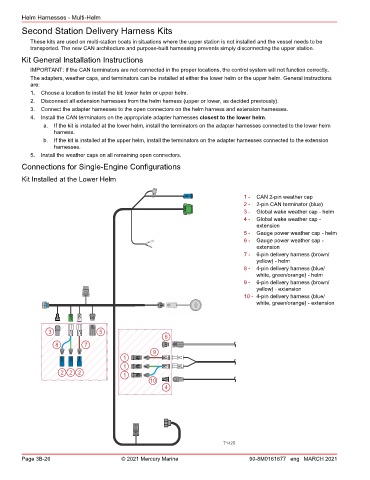
        Connections for Single‑Engine Configurations

        Kit Installed at the Lower Helm


                                                                                  1 -  CAN 2‑pin weather cap
                                                                                  2 -  2‑pin CAN terminator (blue)
                                                                                  3 -  Global wake weather cap ‑ helm
                                                                                  4 -  Global wake weather cap ‑
                                                                                      extension
                                                                                  5 -  Gauge power weather cap ‑ helm
                                                                                  6 -  Gauge power weather cap ‑
                                                                                      extension
                                                                                  7 -  6‑pin delivery harness (brown/
                                                                                      yellow) ‑ helm
                                                                                  8 -  4‑pin delivery harness (blue/
                                                                                      white, green/orange) ‑ helm
                                                                                  9 -  6‑pin delivery harness (brown/
                                                                                      yellow) ‑ extension
                                                                                  10 - 4‑pin delivery harness (blue/
                                                                                      white, green/orange) ‑ extension


                 3                5
                                                        6
                   8         7
                                                    9
                                          1
                                          1
                     2 2 2                1
                                                   10
                                                        4


                                                                           71425

        Page 3B-26                       © 2021 Mercury Marine                      90-8M0161677 eng MARCH 2021

