


Page 37 - Computing book 6
P. 37
Document Creation                                                                    Class 6


               Mail Merge:

               Mail Merge is a useful tool that allows you to produce multiple letters, labels, envelopes, name tags,
               and more using information stored in a list, database, or spreadsheet. When performing a Mail
               Merge, you will need a Word document (you can start with an existing one or create a new one) and
               a recipient list, which is typically an Excel workbook.

               How to use Mail Merge:
                   1.  Open an existing Word document, or create a new one.
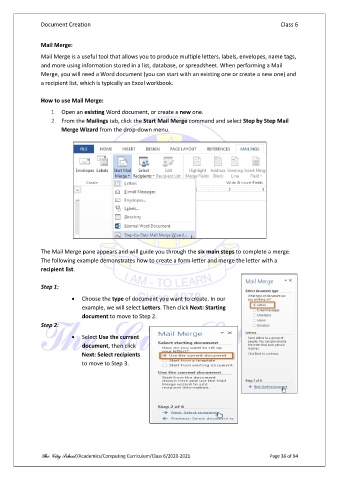
                   2.  From the Mailings tab, click the Start Mail Merge command and select Step by Step Mail
                       Merge Wizard from the drop-down menu.


               The Mail Merge pane appears and will guide you through the six main steps to complete a merge.
               The following example demonstrates how to create a form letter and merge the letter with a
               recipient list.

               Step 1:

                          •  Choose the type of document you want to create. In our
                              example, we will select Letters. Then click Next: Starting
                              document to move to Step 2.
               Step 2:
                          •  Select Use the current
                              document, then click
                              Next: Select recipients
                              to move to Step 3.


               The City School /Academics/Computing Curriculum/Class 6/2020-2021                Page 36 of 94

