


Page 39 - Computing book 6
P. 39
Document Creation                                                                    Class 6


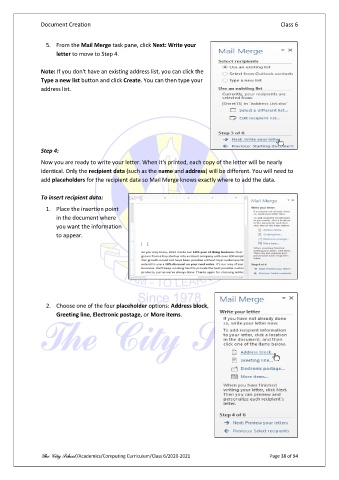
                 5.  From the Mail Merge task pane, click Next: Write your
                     letter to move to Step 4.

               Note: If you don't have an existing address list, you can click the
               Type a new list button and click Create. You can then type your
               address list.


               Step 4:

               Now you are ready to write your letter. When it's printed, each copy of the letter will be nearly
               identical. Only the recipient data (such as the name and address) will be different. You will need to
               add placeholders for the recipient data so Mail Merge knows exactly where to add the data.

               To insert recipient data:
                 1.  Place the insertion point
                     in the document where
                     you want the information
                     to appear.


                 2.  Choose one of the four placeholder options: Address block,
                     Greeting line, Electronic postage, or More items.


               The City School /Academics/Computing Curriculum/Class 6/2020-2021                Page 38 of 94

