


Page 14 - Computing Book 4
P. 14
Creating a Document                                                                  Class 4


               Insert Rows and Columns in an Existing Tables:

               It is easy to modify the look and feel of any table after adding it to a document. Word includes
               different options for customizing a table, including adding rows or columns and changing the table
               style.

               Here is the procedure to add rows and columns in an existing table:

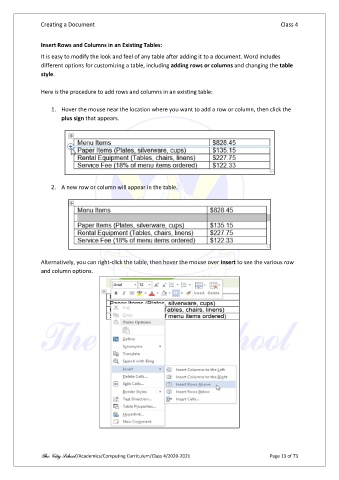
                   1.  Hover the mouse near the location where you want to add a row or column, then click the
                       plus sign that appears.


                   2.  A new row or column will appear in the table.


               Alternatively, you can right-click the table, then hover the mouse over Insert to see the various row
               and column options.


               The City School /Academics/Computing Curriculum/Class 4/2020-2021                Page 13 of 73

