


Page 13 - Computing Book 4
P. 13
Creating a Document                                                                  Class 4


               Tables:

               A table is a grid of cells arranged in rows and columns. Tables are useful for various tasks such as
               presenting text information and numerical data. In Word, you can create a blank table, convert text
               to a table, and apply a variety of styles and formats to existing tables.


               Insert a Blank Table:
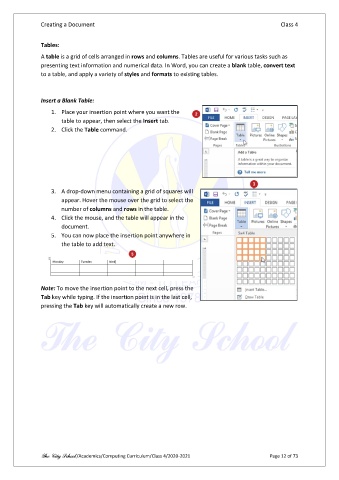
                   1.  Place your insertion point where you want the
                       table to appear, then select the Insert tab.
                   2.  Click the Table command.


                   3.  A drop-down menu containing a grid of squares will
                       appear. Hover the mouse over the grid to select the
                       number of columns and rows in the table.
                   4.  Click the mouse, and the table will appear in the
                       document.
                   5.  You can now place the insertion point anywhere in
                       the table to add text.


               Note: To move the insertion point to the next cell, press the
               Tab key while typing. If the insertion point is in the last cell,
               pressing the Tab key will automatically create a new row.


               The City School /Academics/Computing Curriculum/Class 4/2020-2021                Page 12 of 73

