


Page 45 - Computing Book 4
P. 45
Spreadsheet Formatting                                                               Class 4


               Average Function:

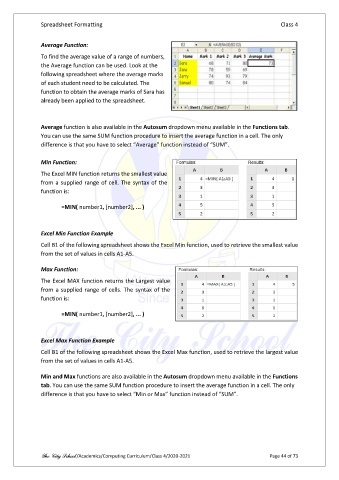
               To find the average value of a range of numbers,
               the Average function can be used. Look at the
               following spreadsheet where the average marks
               of each student need to be calculated. The
               function to obtain the average marks of Sara has
               already been applied to the spreadsheet.


               Average function is also available in the Autosum dropdown menu available in the Functions tab.
               You can use the same SUM function procedure to insert the average function in a cell. The only
               difference is that you have to select “Average” function instead of “SUM”.

               Min Function:

               The Excel MIN function returns the smallest value
               from a supplied range of cell. The syntax of the
               function is:


                       =MIN( number1, [number2], ... )


               Excel Min Function Example

               Cell B1 of the following spreadsheet shows the Excel Min function, used to retrieve the smallest value
               from the set of values in cells A1-A5.

               Max Function:

               The Excel MAX function returns the Largest value
               from a supplied range of cells. The syntax of the
               function is:

                       =MIN( number1, [number2], ... )


               Excel Max Function Example
               Cell B1 of the following spreadsheet shows the Excel Max function, used to retrieve the largest value
               from the set of values in cells A1-A5.


               Min and Max functions are also available in the Autosum dropdown menu available in the Functions
               tab. You can use the same SUM function procedure to insert the average function in a cell. The only
               difference is that you have to select “Min or Max” function instead of “SUM”.


               The City School /Academics/Computing Curriculum/Class 4/2020-2021                Page 44 of 73

