


Page 122 - Learn To Program With Scratch
P. 122
try it out 5-1
                            Select the Player sprite and create a new variable called sum . Set the scope
                            for this variable to For this sprite only . Modify the last block of the Player script
                            to use this new variable, like this:


                               Now select the Die1 (or Die2) sprite and look under the Data palette . Can
                            you explain why you don’t see the sum variable there?


                         The Scope of Variables
                         Another important concept related to variables is scope. The scope of a vari-
                         able determines which sprites can write to (or change the value of) that
                         variable.
           ScopeDemo .sb2    You can specify the scope of a variable when you create it by selecting
                         one of the two options you saw in Figure 5-7. Choosing For this sprite only
                         creates a variable that can be changed only by the sprite that owns it. Other
                         sprites can still read and use the variable’s value, but they can’t write to it.
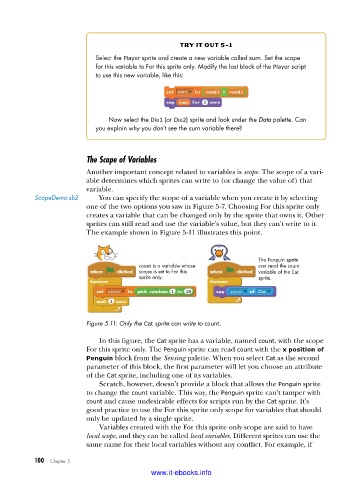
                         The example shown in Figure 5-11 illustrates this point.


                                                                         The Penguin sprite
                                        count is a variable whose        can read the count
                                        scope is set to For this         variable of the Cat
                                        sprite only.                     sprite.


                         Figure 5-11: Only the Cat sprite can write to count .

                             In this figure, the Cat sprite has a variable, named count, with the scope
                         For this sprite only. The Penguin sprite can read count with the x position of
                         Penguin block from the Sensing palette. When you select Cat as the second
                         parameter of this block, the first parameter will let you choose an attribute
                         of the Cat sprite, including one of its variables.
                             Scratch, however, doesn’t provide a block that allows the Penguin sprite
                         to change the count variable. This way, the Penguin sprite can’t tamper with
                         count and cause undesirable effects for scripts run by the Cat sprite. It’s
                         good practice to use the For this sprite only scope for variables that should
                         only be updated by a single sprite.
                             Variables created with the For this sprite only scope are said to have
                         local scope, and they can be called local variables. Different sprites can use the
                         same name for their local variables without any conflict. For example, if


           100   Chapter 5
                                           www.it-ebooks.info

