


Page 124 - Learn To Program With Scratch
P. 124
global variables, are useful for intersprite communication and synchroniza-
                         tion. For example, if a game has three buttons that allow the user to select
                         a level to play, you can create a global variable named gameLevel and have
                         each button sprite set this variable to a different number when clicked.
                         Then you can easily find out the user’s choice by examining gameLevel.
                             Selecting the For all sprites option also enables the Cloud variable check-
                         box in Figure 5-7. This feature allows you to store your variables on Scratch’s
                         server (in the cloud). Blocks for cloud variables have a small square in front
                         of them to distinguish them from regular variables, like this:


                             Anyone who views a project you’ve shared on the Scratch website can
                         read the cloud variables in the project. For example, if you share a game,
                         you can use a cloud variable to track the highest score recorded among all
                         the players. The score cloud variable should update almost immediately for
                         everyone interacting with your game. Because these variables are stored on
                         Scratch servers, they keep their value even if you exit your browser. Cloud
                         variables make it easy to create surveys and other projects that store num-
                         bers over time.
                             Now that you understand scope, it’s time to learn about  updating
                           variables—and then use that knowledge to create more interesting
                         programs.

                         Changing Variables
                         Scratch provides two command blocks that
                         allow you to alter variables. The set to com-
                         mand directly assigns a new value to a vari-
                         able, regardless of its current contents. The
                         change by command, on the other hand,
                         is used to change the value of a variable
                         by a specified amount relative to its cur-
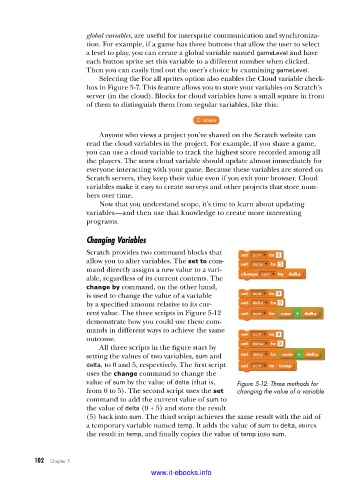
                         rent value. The three scripts in Figure 5-12
                         demonstrate how you could use these com-
                         mands in different ways to achieve the same
                         outcome.
                             All three scripts in the figure start by
                         setting the values of two variables, sum and
                         delta, to 0 and 5, respectively. The first script
                         uses the change command to change the
                         value of sum by the value of delta (that is,   Figure 5-12: Three methods for
                         from 0 to 5). The second script uses the set   changing the value of a variable
                         command to add the current value of sum to
                         the value of delta (0 + 5) and store the result
                         (5) back into sum. The third script achieves the same result with the aid of
                         a temporary variable named temp. It adds the value of sum to delta, stores
                         the result in temp, and finally copies the value of temp into sum.


           102   Chapter 5
                                           www.it-ebooks.info

