


Page 276 - Basic Course
P. 276
KNX BASIC COURSE

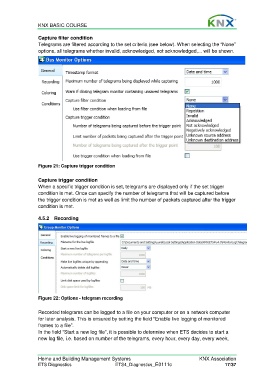
                  Capture filter condition
                  Telegrams are filtered according to the set criteria (see below). When selecting the “None”
                  options, all telegrams whether invalid, acknowledged, not acknowledged,... will be shown.


                  Figure 21: Capture trigger condition

                  Capture trigger condition
                  When a specific trigger condition is set, telegrams are displayed only if the set trigger
                  condition is met. Once can specify the number of telegrams that will be captured before
                  the trigger condition is met as well as limit the number of packets captured after the trigger
                  condition is met.


                  4.5.2 Recording


                  Figure 22: Options - telegram recording

                  Recorded telegrams can be logged to a file on your computer or on a network computer
                  for later analysis. This is ensured by setting the field “Enable live logging of monitored
                  frames to a file”.
                  In the field “Start a new log file”, it is possible to determine when ETS decides to start a
                  new log file, i.e. based on number of the telegrams, every hour, every day, every week,


                  Home and Building Management Systems                                    KNX Association
                  ETS Diagnostics                   ETS4_Diagnostics_E0111c                          17/37

