


Page 288 - Basic Course
P. 288
KNX BASIC COURSE


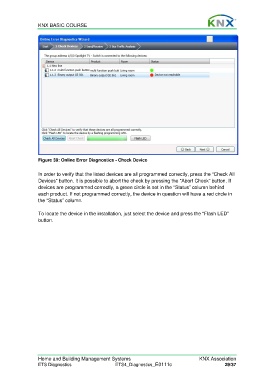
                  Figure 39: Online Error Diagnostics - Check Device

                  In order to verify that the listed devices are all programmed correctly, press the “Check All
                  Devices” button. It is possible to abort the check by pressing the “Abort Check” button. If
                  devices are programmed correctly, a green circle is set in the “Status” column behind
                  each product. If not programmed correctly, the device in question will have a red circle in
                  the “Status” column.

                  To locate the device in the installation, just select the device and press the “Flash LED”
                  button.


                  Home and Building Management Systems                                    KNX Association
                  ETS Diagnostics                   ETS4_Diagnostics_E0111c                          29/37

