


Page 172 - Python Data Science Handbook
P. 172
df9 = pd.DataFrame({'name': ['Bob', 'Jake', 'Lisa', 'Sue'],
                                               'rank': [3, 1, 4, 2]})
                           print(df8); print(df9); print(pd.merge(df8, df9, on="name"))
                   df8                df9               pd.merge(df8, df9, on="name")
                       name  rank         name  rank       name  rank_x  rank_y
                   0   Bob     1      0   Bob     3     0   Bob       1       3
                   1  Jake     2      1  Jake     1     1  Jake       2       1
                   2  Lisa     3      2  Lisa     4     2  Lisa       3       4
                   3   Sue     4      3   Sue     2     3   Sue       4       2
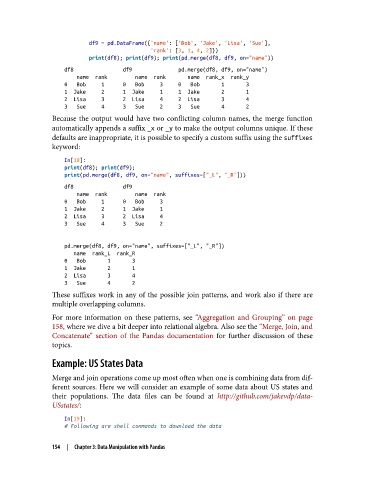
               Because the output would have two conflicting column names, the merge function
               automatically appends a suffix _x or _y to make the output columns unique. If these
               defaults are inappropriate, it is possible to specify a custom suffix using the suffixes
               keyword:

                   In[18]:
                   print(df8); print(df9);
                   print(pd.merge(df8, df9, on="name", suffixes=["_L", "_R"]))
                   df8                df9
                       name  rank         name  rank
                   0   Bob     1      0   Bob     3
                   1  Jake     2      1  Jake     1
                   2  Lisa     3      2  Lisa     4
                   3   Sue     4      3   Sue     2


                   pd.merge(df8, df9, on="name", suffixes=["_L", "_R"])
                      name  rank_L  rank_R
                   0   Bob       1       3
                   1  Jake       2       1
                   2  Lisa       3       4
                   3   Sue       4       2
               These suffixes work in any of the possible join patterns, and work also if there are
               multiple overlapping columns.
               For more information on these patterns, see “Aggregation and Grouping” on page
               158, where we dive a bit deeper into relational algebra. Also see the “Merge, Join, and
               Concatenate” section of the Pandas documentation  for further discussion of these
               topics.

               Example: US States Data

               Merge and join operations come up most often when one is combining data from dif‐
               ferent sources. Here we will consider an example of some data about US states and
               their populations. The data files can be found at http://github.com/jakevdp/data-
               USstates/:

                   In[19]:
                   # Following are shell commands to download the data

               154  |  Chapter 3: Data Manipulation with Pandas

