


Page 167 - Python Data Science Handbook
P. 167
'skills': ['math', 'spreadsheets', 'coding', 'linux',
                                                         'spreadsheets', 'organization']})
                   print(df1); print(df5); print(pd.merge(df1, df5))
                   df1                          df5
                     employee        group               group        skills
                   0      Bob   Accounting      0   Accounting          math
                   1     Jake  Engineering      1   Accounting  spreadsheets
                   2     Lisa  Engineering      2  Engineering        coding
                   3      Sue           HR      3  Engineering         linux
                                                4           HR  spreadsheets
                                                5           HR  organization

                   pd.merge(df1, df5)
                     employee        group        skills
                   0      Bob   Accounting          math
                   1      Bob   Accounting  spreadsheets
                   2     Jake  Engineering        coding
                   3     Jake  Engineering         linux
                   4     Lisa  Engineering        coding
                   5     Lisa  Engineering         linux
                   6      Sue           HR  spreadsheets
                   7      Sue           HR  organization
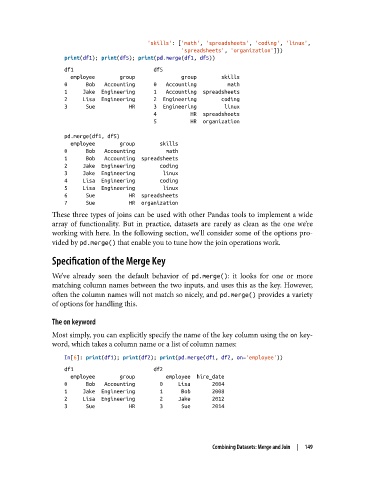
               These three types of joins can be used with other Pandas tools to implement a wide
               array of functionality. But in practice, datasets are rarely as clean as the one we’re
               working with here. In the following section, we’ll consider some of the options pro‐
               vided by pd.merge() that enable you to tune how the join operations work.

               Specification of the Merge Key

               We’ve already seen the default behavior of pd.merge(): it looks for one or more
               matching column names between the two inputs, and uses this as the key. However,
               often the column names will not match so nicely, and pd.merge() provides a variety
               of options for handling this.

               The on keyword

               Most simply, you can explicitly specify the name of the key column using the on key‐
               word, which takes a column name or a list of column names:

                   In[6]: print(df1); print(df2); print(pd.merge(df1, df2, on='employee'))
                   df1                          df2
                     employee        group          employee  hire_date
                   0      Bob   Accounting        0     Lisa       2004
                   1     Jake  Engineering        1      Bob       2008
                   2     Lisa  Engineering        2     Jake       2012
                   3      Sue           HR        3      Sue       2014


                                                            Combining Datasets: Merge and Join  |  149

