


Page 178 - Python Data Science Handbook
P. 178
In[7]: df = pd.DataFrame({'A': rng.rand(5),
                                             'B': rng.rand(5)})
                          df
                   Out[7]:           A         B
                           0  0.155995  0.020584
                           1  0.058084  0.969910
                           2  0.866176  0.832443
                           3  0.601115  0.212339
                           4  0.708073  0.181825
                   In[8]: df.mean()
                   Out[8]: A    0.477888
                           B    0.443420
                           dtype: float64
               By specifying the axis argument, you can instead aggregate within each row:

                   In[9]: df.mean(axis='columns')
                   Out[9]: 0    0.088290
                           1    0.513997
                           2    0.849309
                           3    0.406727
                           4    0.444949
                           dtype: float64
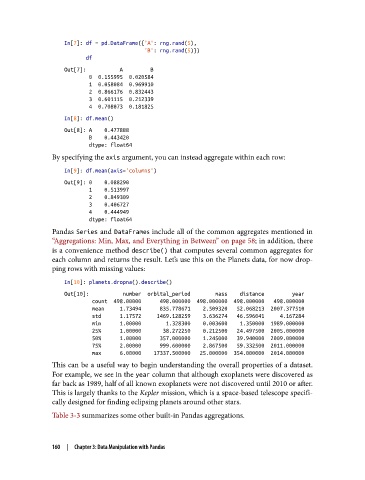
               Pandas Series and DataFrames include all of the common aggregates mentioned in
               “Aggregations: Min, Max, and Everything in Between” on page 58; in addition, there
               is a convenience method describe() that computes several common aggregates for
               each column and returns the result. Let’s use this on the Planets data, for now drop‐
               ping rows with missing values:

                   In[10]: planets.dropna().describe()
                   Out[10]:           number  orbital_period        mass    distance         year
                            count  498.00000      498.000000  498.000000  498.000000   498.000000
                            mean     1.73494      835.778671    2.509320   52.068213  2007.377510
                            std      1.17572     1469.128259    3.636274   46.596041     4.167284
                            min      1.00000        1.328300    0.003600    1.350000  1989.000000
                            25%      1.00000       38.272250    0.212500   24.497500  2005.000000
                            50%      1.00000      357.000000    1.245000   39.940000  2009.000000
                            75%      2.00000      999.600000    2.867500   59.332500  2011.000000
                            max      6.00000    17337.500000   25.000000  354.000000  2014.000000
               This can be a useful way to begin understanding the overall properties of a dataset.
               For example, we see in the year column that although exoplanets were discovered as
               far back as 1989, half of all known exoplanets were not discovered until 2010 or after.
               This is largely thanks to the Kepler mission, which is a space-based telescope specifi‐
               cally designed for finding eclipsing planets around other stars.

               Table 3-3 summarizes some other built-in Pandas aggregations.


               160  |  Chapter 3: Data Manipulation with Pandas

