


Page 180 - Python Data Science Handbook
P. 180
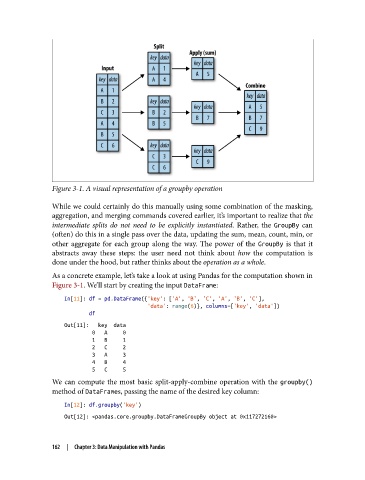
Figure 3-1. A visual representation of a groupby operation

               While we could certainly do this manually using some combination of the masking,
               aggregation, and merging commands covered earlier, it’s important to realize that the
               intermediate splits do not need to be explicitly instantiated. Rather, the GroupBy  can
               (often) do this in a single pass over the data, updating the sum, mean, count, min, or
               other aggregate for each group along the way. The power of the GroupBy  is that it
               abstracts away these steps: the user need not think about how  the computation is
               done under the hood, but rather thinks about the operation as a whole.

               As a concrete example, let’s take a look at using Pandas for the computation shown in
               Figure 3-1. We’ll start by creating the input DataFrame:

                   In[11]: df = pd.DataFrame({'key': ['A', 'B', 'C', 'A', 'B', 'C'],
                                              'data': range(6)}, columns=['key', 'data'])
                           df

                   Out[11]:   key  data
                            0   A     0
                            1   B     1
                            2   C     2
                            3   A     3
                            4   B     4
                            5   C     5
               We can compute the most basic split-apply-combine operation with the groupby()
               method of DataFrames, passing the name of the desired key column:

                   In[12]: df.groupby('key')
                   Out[12]: <pandas.core.groupby.DataFrameGroupBy object at 0x117272160>


               162  |  Chapter 3: Data Manipulation with Pandas

