


Page 182 - Python Data Science Handbook
P. 182
Out[16]: method
                            Astrometry                         631.180000
                            Eclipse Timing Variations         4343.500000
                            Imaging                          27500.000000
                            Microlensing                      3300.000000
                            Orbital Brightness Modulation        0.342887
                            Pulsar Timing                       66.541900
                            Pulsation Timing Variations       1170.000000
                            Radial Velocity                    360.200000
                            Transit                              5.714932
                            Transit Timing Variations           57.011000
                            Name: orbital_period, dtype: float64
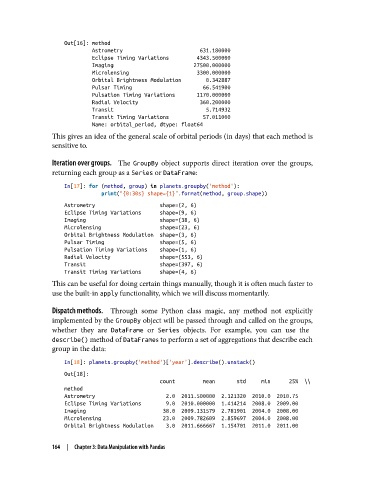
               This gives an idea of the general scale of orbital periods (in days) that each method is
               sensitive to.

               Iteration over groups.     The GroupBy  object supports direct iteration over the groups,
               returning each group as a Series or DataFrame:

                   In[17]: for (method, group) in planets.groupby('method'):
                               print("{0:30s} shape={1}".format(method, group.shape))
                   Astrometry                     shape=(2, 6)
                   Eclipse Timing Variations      shape=(9, 6)
                   Imaging                        shape=(38, 6)
                   Microlensing                   shape=(23, 6)
                   Orbital Brightness Modulation  shape=(3, 6)
                   Pulsar Timing                  shape=(5, 6)
                   Pulsation Timing Variations    shape=(1, 6)
                   Radial Velocity                shape=(553, 6)
                   Transit                        shape=(397, 6)
                   Transit Timing Variations      shape=(4, 6)
               This can be useful for doing certain things manually, though it is often much faster to
               use the built-in apply functionality, which we will discuss momentarily.

               Dispatch methods.     Through some Python class magic, any method not explicitly
               implemented by the GroupBy object will be passed through and called on the groups,
               whether they are DataFrame  or Series  objects. For example, you can use the
               describe() method of DataFrames to perform a set of aggregations that describe each
               group in the data:

                   In[18]: planets.groupby('method')['year'].describe().unstack()
                   Out[18]:
                                                  count         mean       std     min      25%  \\
                   method
                   Astrometry                       2.0  2011.500000  2.121320  2010.0  2010.75
                   Eclipse Timing Variations        9.0  2010.000000  1.414214  2008.0  2009.00
                   Imaging                         38.0  2009.131579  2.781901  2004.0  2008.00
                   Microlensing                    23.0  2009.782609  2.859697  2004.0  2008.00
                   Orbital Brightness Modulation    3.0  2011.666667  1.154701  2011.0  2011.00

               164  |  Chapter 3: Data Manipulation with Pandas

