


Page 289 - Python Data Science Handbook
P. 289
Any graphics display framework needs some scheme for translating between coordi‐
               nate systems. For example, a data point at  x, y = 1, 1  needs to somehow be repre‐
               sented at a certain location on the figure, which in turn needs to be represented in
               pixels on the screen. Mathematically, such coordinate transformations are relatively
               straightforward, and Matplotlib has a well-developed set of tools that it uses inter‐
               nally to perform them (the tools can be explored in the matplotlib.transforms sub‐
               module).
               The average user rarely needs to worry about the details of these transforms, but it is
               helpful knowledge to have when considering the placement of text on a figure. There
               are three predefined transforms that can be useful in this situation:
               ax.transData
                   Transform associated with data coordinates
               ax.transAxes
                   Transform associated with the axes (in units of axes dimensions)
               fig.transFigure
                   Transform associated with the figure (in units of figure dimensions)
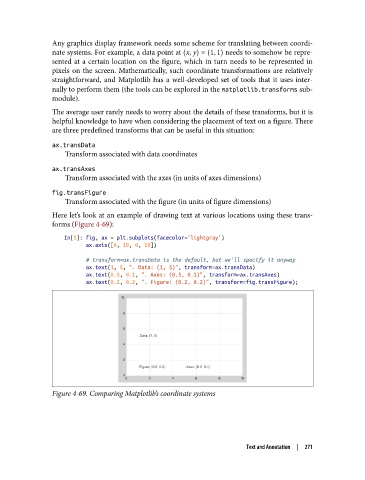
               Here let’s look at an example of drawing text at various locations using these trans‐
               forms (Figure 4-69):
                   In[5]: fig, ax = plt.subplots(facecolor='lightgray')
                          ax.axis([0, 10, 0, 10])
                          # transform=ax.transData is the default, but we'll specify it anyway
                          ax.text(1, 5, ". Data: (1, 5)", transform=ax.transData)
                          ax.text(0.5, 0.1, ". Axes: (0.5, 0.1)", transform=ax.transAxes)
                          ax.text(0.2, 0.2, ". Figure: (0.2, 0.2)", transform=fig.transFigure);


               Figure 4-69. Comparing Matplotlib’s coordinate systems


                                                                     Text and Annotation  |  271

