


Page 290 - Python Data Science Handbook
P. 290
Note that by default, the text is aligned above and to the left of the specified coordi‐
               nates; here the “.” at the beginning of each string will approximately mark the given
               coordinate location.
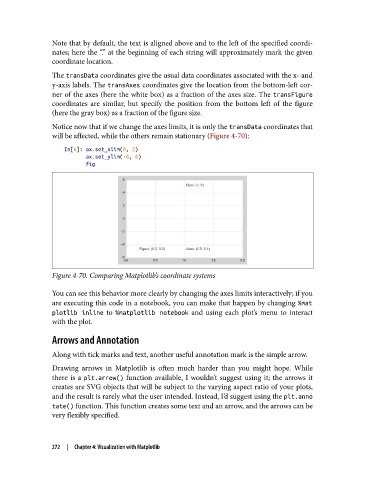
               The transData coordinates give the usual data coordinates associated with the x- and
               y-axis labels. The transAxes coordinates give the location from the bottom-left cor‐
               ner of the axes (here the white box) as a fraction of the axes size. The transFigure
               coordinates are similar, but specify the position from the bottom left of the figure
               (here the gray box) as a fraction of the figure size.

               Notice now that if we change the axes limits, it is only the transData coordinates that
               will be affected, while the others remain stationary (Figure 4-70):

                   In[6]: ax.set_xlim(0, 2)
                          ax.set_ylim(-6, 6)
                          fig


               Figure 4-70. Comparing Matplotlib’s coordinate systems


               You can see this behavior more clearly by changing the axes limits interactively; if you
               are executing this code in a notebook, you can make that happen by changing %mat
               plotlib inline  to %matplotlib notebook  and using each plot’s menu to interact
               with the plot.

               Arrows and Annotation

               Along with tick marks and text, another useful annotation mark is the simple arrow.
               Drawing arrows in Matplotlib is often much harder than you might hope. While
               there is a plt.arrow()  function available, I wouldn’t suggest using it; the arrows it
               creates are SVG objects that will be subject to the varying aspect ratio of your plots,
               and the result is rarely what the user intended. Instead, I’d suggest using the plt.anno
               tate() function. This function creates some text and an arrow, and the arrows can be
               very flexibly specified.


               272  |  Chapter 4: Visualization with Matplotlib

