


Page 291 - Python Data Science Handbook
P. 291
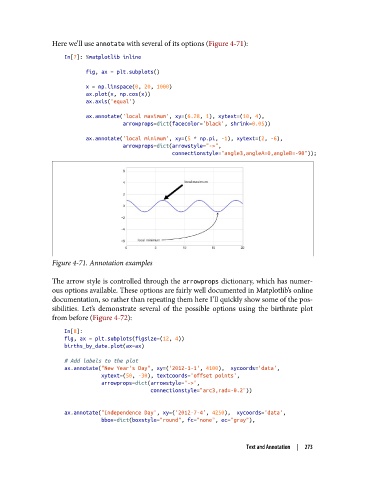
Here we’ll use annotate with several of its options (Figure 4-71):
                   In[7]: %matplotlib inline

                          fig, ax = plt.subplots()
                          x = np.linspace(0, 20, 1000)
                          ax.plot(x, np.cos(x))
                          ax.axis('equal')

                          ax.annotate('local maximum', xy=(6.28, 1), xytext=(10, 4),
                                      arrowprops=dict(facecolor='black', shrink=0.05))
                          ax.annotate('local minimum', xy=(5 * np.pi, -1), xytext=(2, -6),
                                      arrowprops=dict(arrowstyle="->",
                                                      connectionstyle="angle3,angleA=0,angleB=-90"));


               Figure 4-71. Annotation examples


               The arrow style is controlled through the arrowprops dictionary, which has numer‐
               ous options available. These options are fairly well documented in Matplotlib’s online
               documentation, so rather than repeating them here I’ll quickly show some of the pos‐
               sibilities. Let’s demonstrate several of the possible options using the birthrate plot
               from before (Figure 4-72):
                   In[8]:
                   fig, ax = plt.subplots(figsize=(12, 4))
                   births_by_date.plot(ax=ax)

                   # Add labels to the plot
                   ax.annotate("New Year's Day", xy=('2012-1-1', 4100),  xycoords='data',
                               xytext=(50, -30), textcoords='offset points',
                               arrowprops=dict(arrowstyle="->",
                                               connectionstyle="arc3,rad=-0.2"))

                   ax.annotate("Independence Day", xy=('2012-7-4', 4250),  xycoords='data',
                               bbox=dict(boxstyle="round", fc="none", ec="gray"),


                                                                     Text and Annotation  |  273

