


Page 324 - Python Data Science Handbook
P. 324
For the boundary-based features, you must set the desired resolution when creating a
               Basemap image. The resolution argument of the Basemap class sets the level of detail
               in boundaries, either 'c' (crude), 'l' (low), 'i' (intermediate), 'h' (high), 'f' (full),
               or None  if no boundaries will be used. This choice is important: setting high-
               resolution boundaries on a global map, for example, can be very slow.
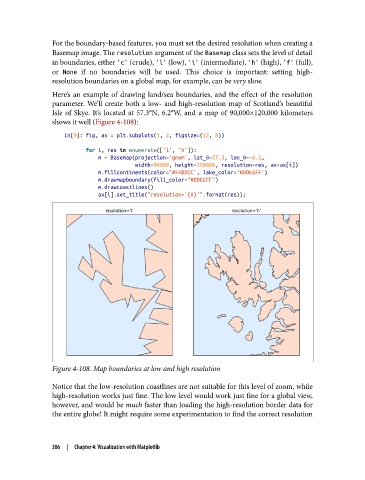
               Here’s an example of drawing land/sea boundaries, and the effect of the resolution
               parameter. We’ll create both a low- and high-resolution map of Scotland’s beautiful
               Isle of Skye. It’s located at 57.3°N, 6.2°W, and a map of 90,000×120,000 kilometers
               shows it well (Figure 4-108):

                   In[9]: fig, ax = plt.subplots(1, 2, figsize=(12, 8))
                          for i, res in enumerate(['l', 'h']):
                              m = Basemap(projection='gnom', lat_0=57.3, lon_0=-6.2,
                                          width=90000, height=120000, resolution=res, ax=ax[i])
                              m.fillcontinents(color="#FFDDCC", lake_color='#DDEEFF')
                              m.drawmapboundary(fill_color="#DDEEFF")
                              m.drawcoastlines()
                              ax[i].set_title("resolution='{0}'".format(res));


               Figure 4-108. Map boundaries at low and high resolution

               Notice that the low-resolution coastlines are not suitable for this level of zoom, while
               high-resolution works just fine. The low level would work just fine for a global view,
               however, and would be much faster than loading the high-resolution border data for
               the entire globe! It might require some experimentation to find the correct resolution


               306  |  Chapter 4: Visualization with Matplotlib

