


Page 89 - Python Data Science Handbook
P. 89
In[2]: %matplotlib inline
                          import matplotlib.pyplot as plt
                          import seaborn; seaborn.set()  # set plot styles
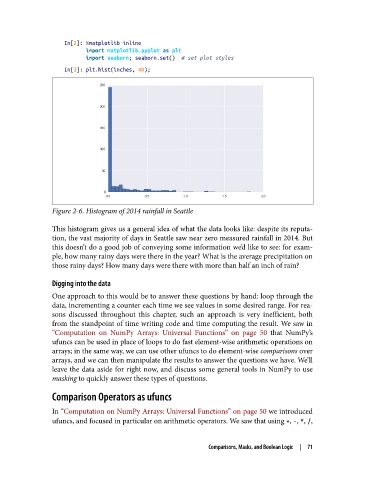
                   In[3]: plt.hist(inches, 40);


               Figure 2-6. Histogram of 2014 rainfall in Seattle

               This histogram gives us a general idea of what the data looks like: despite its reputa‐
               tion, the vast majority of days in Seattle saw near zero measured rainfall in 2014. But
               this doesn’t do a good job of conveying some information we’d like to see: for exam‐
               ple, how many rainy days were there in the year? What is the average precipitation on
               those rainy days? How many days were there with more than half an inch of rain?

               Digging into the data
               One approach to this would be to answer these questions by hand: loop through the
               data, incrementing a counter each time we see values in some desired range. For rea‐
               sons discussed throughout this chapter, such an approach is very inefficient, both
               from the standpoint of time writing code and time computing the result. We saw in
               “Computation on NumPy Arrays: Universal Functions” on page 50  that NumPy’s
               ufuncs can be used in place of loops to do fast element-wise arithmetic operations on
               arrays; in the same way, we can use other ufuncs to do element-wise comparisons over
               arrays, and we can then manipulate the results to answer the questions we have. We’ll
               leave the data aside for right now, and discuss some general tools in NumPy to use
               masking to quickly answer these types of questions.

               Comparison Operators as ufuncs

               In “Computation on NumPy Arrays: Universal Functions” on page 50 we introduced
               ufuncs, and focused in particular on arithmetic operators. We saw that using +, -, *, /,


                                                           Comparisons, Masks, and Boolean Logic  |  71

