


Page 19 - 18-868 SEO PowerSuite Workflow_VPMGC
P. 19
SEO Workflow


               up in the top results, and help you decide which page of your site you should

               target each keyword group with.


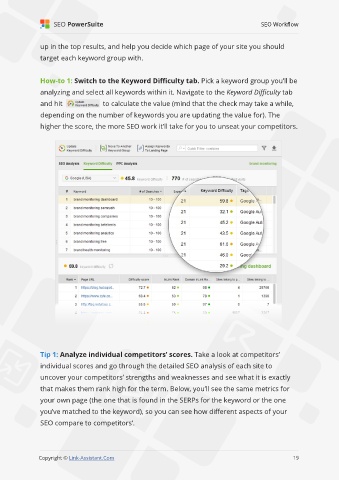
               How-to 1: Switch to the Keyword Difficulty tab. Pick a keyword group you’ll be
               analyzing and select all keywords within it. Navigate to the Keyword Difficulty tab

               and hit                to calculate the value (mind that the check may take a while,
               depending on the number of keywords you are updating the value for). The

               higher the score, the more SEO work it’ll take for you to unseat your competitors.


               Tip 1: Analyze individual competitors’ scores. Take a look at competitors’
               individual scores and go through the detailed SEO analysis of each site to

               uncover your competitors’ strengths and weaknesses and see what it is exactly
               that makes them rank high for the term. Below, you’ll see the same metrics for

               your own page (the one that is found in the SERPs for the keyword or the one
               you’ve matched to the keyword), so you can see how different aspects of your

               SEO compare to competitors’.


                                                                                                             19

               Copyright © Link-Assistant.Com                                                           19

