


Page 36 - MercNET User's Guide
P. 36
3.  Select the Reference Number link to view your request
        Note: This is for viewing purposes only. You will not be able to update the original request.

        Customer Service Index (CSI)/Service Rates
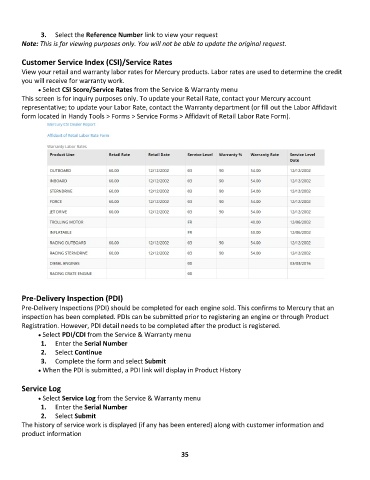
        View your retail and warranty labor rates for Mercury products. Labor rates are used to determine the credit
        you will receive for warranty work.
              • •   Select CSI Score/Service Rates from the Service & Warranty menu
        This screen is for inquiry purposes only. To update your Retail Rate, contact your Mercury account
        representative; to update your Labor Rate, contact the Warranty department (or fill out the Labor Affidavit
        form located in Handy Tools > Forms > Service Forms > Affidavit of Retail Labor Rate Form).


        Pre-Delivery Inspection (PDI)
        Pre-Delivery Inspections (PDI) should be completed for each engine sold. This confirms to Mercury that an
        inspection has been completed. PDIs can be submitted prior to registering an engine or through Product
        Registration. However, PDI detail needs to be completed after the product is registered.
              • •   Select PDI/CDI from the Service & Warranty menu
               1.  Enter the Serial Number
               2.  Select Continue
               3.  Complete the form and select Submit
              • •   When the PDI is submitted, a PDI link will display in Product History

        Service Log

              • •   Select Service Log from the Service & Warranty menu
               1.  Enter the Serial Number
               2.  Select Submit
        The history of service work is displayed (if any has been entered) along with customer information and
        product information


                                                             35

