


Page 31 - MercNET User's Guide
P. 31
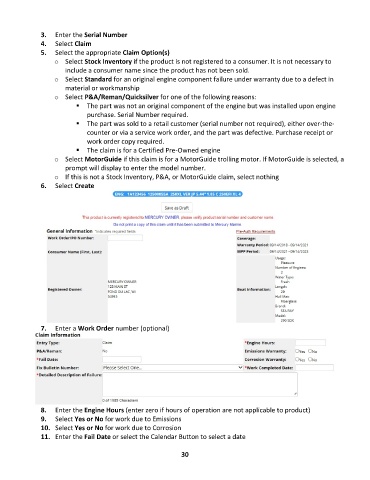
3.  Enter the Serial Number
               4.  Select Claim
               5.  Select the appropriate Claim Option(s)
                   o  Select Stock Inventory if the product is not registered to a consumer. It is not necessary to
                       include a consumer name since the product has not been sold.
                   o  Select Standard for an original engine component failure under warranty due to a defect in
                       material or workmanship
                   o  Select P&A/Reman/Quicksilver for one of the following reasons:
                          ▪  The part was not an original component of the engine but was installed upon engine
                              purchase. Serial Number required.
                          ▪  The part was sold to a retail customer (serial number not required), either over-the-
                              counter or via a service work order, and the part was defective. Purchase receipt or
                              work order copy required.
                          ▪  The claim is for a Certified Pre-Owned engine
                   o  Select MotorGuide if this claim is for a MotorGuide trolling motor. If MotorGuide is selected, a
                       prompt will display to enter the model number.
                   o  If this is not a Stock Inventory, P&A, or MotorGuide claim, select nothing
               6.  Select Create


               7.  Enter a Work Order number (optional)


               8.  Enter the Engine Hours (enter zero if hours of operation are not applicable to product)
               9.  Select Yes or No for work due to Emissions
               10.  Select Yes or No for work due to Corrosion
               11.  Enter the Fail Date or select the Calendar Button to select a date


                                                             30

