


Page 13 - MercNET User's Guide
P. 13
• •   Save Cart – Allows you to save your shopping cart for 90 days (items will appear in a separate shopping
               cart under My Carts)
              • •   Save to List – Allows you to save the shopping cart as a list that never expires (ideal for stocking orders
               that are placed on a regular basis)
              • •   Delete Cart – Will remove all items from the cart
              • •   View Discounts/Surcharges – Expands an itemized list of discounts and/or surcharges for all applicable
               items in the cart
              • •   View Comments – Allows you to enter comments for each line item (will display on packing slip)
        Note: Promotions that are active during specific timeframes will be displayed on the cart page. Watch for a
        drop-down menu with options during these times.

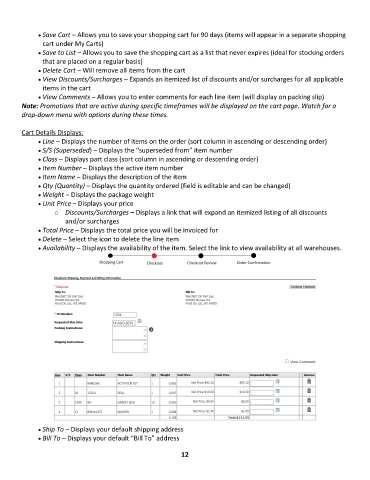
        Cart Details Displays:
              • •   Line – Displays the number of items on the order (sort column in ascending or descending order)
              • •   S/S (Superseded) – Displays the “superseded from” item number
              • •   Class – Displays part class (sort column in ascending or descending order)
              • •   Item Number – Displays the active item number
              • •   Item Name – Displays the description of the item
              • •   Qty (Quantity) – Displays the quantity ordered (field is editable and can be changed)
              • •   Weight – Displays the package weight
              • •   Unit Price – Displays your price
                   o  Discounts/Surcharges – Displays a link that will expand an itemized listing of all discounts
                       and/or surcharges
              • •   Total Price – Displays the total price you will be invoiced for
              • •   Delete – Select the icon to delete the line item
              • •   Availability – Displays the availability of the item. Select the link to view availability at all warehouses.


              • •   Ship To – Displays your default shipping address
              • •   Bill To – Displays your default “Bill To” address

                                                             12

