


Page 19 - MercNET User's Guide
P. 19
• •   Shipment Details – Select the link to view shipping details
              • •   Ship To – Displays the “Ship To” name if different from the “Bill To”
              • •   Order Source – Displays how the order was placed (if blank, order was entered by sales department)

        View Order Detail
        Displays order details by the header (order) level and at the line level.
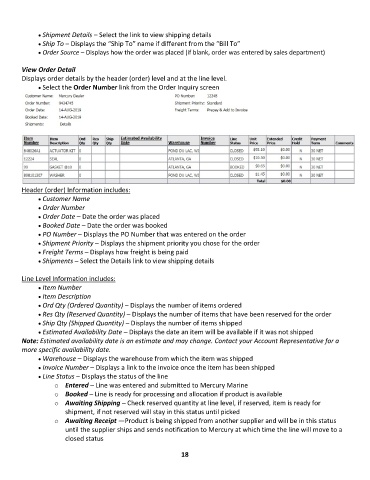
              • •   Select the Order Number link from the Order Inquiry screen


        Header (order) Information includes:
              • •   Customer Name
              • •   Order Number
              • •   Order Date – Date the order was placed
              • •   Booked Date – Date the order was booked
              • •   PO Number – Displays the PO Number that was entered on the order
              • •   Shipment Priority – Displays the shipment priority you chose for the order
              • •   Freight Terms – Displays how freight is being paid
              • •   Shipments – Select the Details link to view shipping details

        Line Level Information includes:
              • •   Item Number
              • •   Item Description
              • •   Ord Qty (Ordered Quantity) – Displays the number of items ordered
              • •   Res Qty (Reserved Quantity) – Displays the number of items that have been reserved for the order
              • •   Ship Qty (Shipped Quantity) – Displays the number of items shipped
              • •   Estimated Availability Date – Displays the date an item will be available if it was not shipped
        Note: Estimated availability date is an estimate and may change. Contact your Account Representative for a
        more specific availability date.
              • •   Warehouse – Displays the warehouse from which the item was shipped
              • •   Invoice Number – Displays a link to the invoice once the item has been shipped
              • •   Line Status – Displays the status of the line
                   o  Entered – Line was entered and submitted to Mercury Marine
                   o  Booked – Line is ready for processing and allocation if product is available
                   o  Awaiting Shipping – Check reserved quantity at line level, if reserved, item is ready for
                       shipment, if not reserved will stay in this status until picked
                   o  Awaiting Receipt —Product is being shipped from another supplier and will be in this status
                       until the supplier ships and sends notification to Mercury at which time the line will move to a
                       closed status

                                                             18

