


Page 20 - MercNET User's Guide
P. 20
o  Awaiting Return – Return request started, waiting for return of item
                   o  Awaiting Fulfillment —Line is a component of a kit and will be in this status as the order awaits
                       the components to be filled
                   o  Picked—Lines has dropped to the warehouse.  It is at this point that a delivery number is
                       assigned
                   o  Shipped—Lines have been shipped from the warehouse to the customer
                   o  Closed – Line invoiced
                   o  Cancelled –Line cancelled by customer or Mercury
              • •   Unit Price – Displays the unit price of the item with discounts and surcharges (if applicable)
              • •   Extended Price – Displays the total price you will be invoiced
              • •   Credit Hold – Displays Y (yes) or N (no) depending on your credit status
              • •   Payment Terms – Displays the payment terms for each line item
              • •   Comments – Displays line comments if entered on order

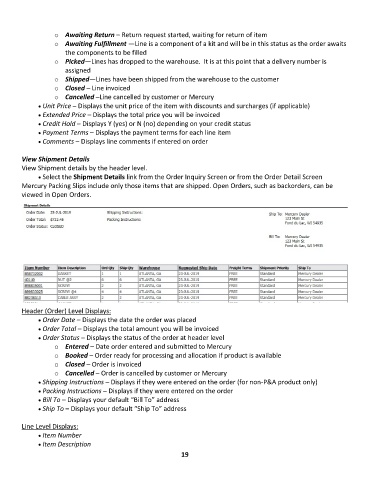
        View Shipment Details
        View Shipment details by the header level.
              • •   Select the Shipment Details link from the Order Inquiry Screen or from the Order Detail Screen
        Mercury Packing Slips include only those items that are shipped. Open Orders, such as backorders, can be
        viewed in Open Orders.


        Header (Order) Level Displays:
              • •   Order Date – Displays the date the order was placed
              • •   Order Total – Displays the total amount you will be invoiced
              • •   Order Status – Displays the status of the order at header level
                   o  Entered – Date order entered and submitted to Mercury
                   o  Booked – Order ready for processing and allocation if product is available
                   o  Closed – Order is invoiced
                   o  Cancelled – Order is cancelled by customer or Mercury
              • •   Shipping Instructions – Displays if they were entered on the order (for non-P&A product only)
              • •   Packing Instructions – Displays if they were entered on the order
              • •   Bill To – Displays your default “Bill To” address
              • •   Ship To – Displays your default “Ship To” address

        Line Level Displays:
              • •   Item Number
              • •   Item Description
                                                             19

