


Page 21 - MercNET User's Guide
P. 21
• •   Ord Qty (Ordered Quantity) – Displays number of items ordered
              • •   Ship Qty (Shipped Quantity) – Displays number of items shipped
              • •   Warehouse – Displays the warehouse the item was shipped from
              • •   Requested Ship Date – Displays only if different than the order date
              • •   Freight Terms – Displays how the freight is being paid
              • •   Shipment Priority- Displays the shipment priority you chose for the order
              • •   Ship To – Displays Ship To information by line

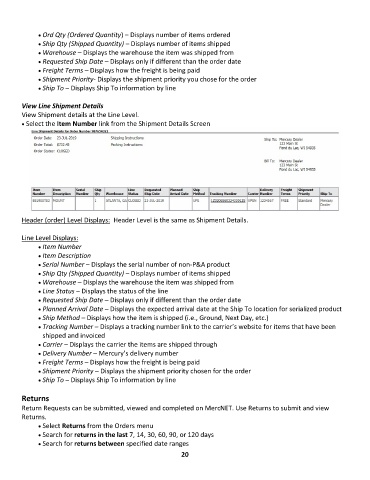
        View Line Shipment Details
        View Shipment details at the Line Level.
        • Select the Item Number link from the Shipment Details Screen


        Header (order) Level Displays:  Header Level is the same as Shipment Details.

        Line Level Displays:
              • •   Item Number
              • •   Item Description
              • •   Serial Number – Displays the serial number of non-P&A product
              • •   Ship Qty (Shipped Quantity) – Displays number of items shipped
              • •   Warehouse – Displays the warehouse the item was shipped from
              • •   Line Status – Displays the status of the line
              • •   Requested Ship Date – Displays only if different than the order date
              • •   Planned Arrival Date – Displays the expected arrival date at the Ship To location for serialized product
              • •   Ship Method – Displays how the item is shipped (i.e., Ground, Next Day, etc.)
              • •   Tracking Number – Displays a tracking number link to the carrier’s website for items that have been
               shipped and invoiced
              • •   Carrier – Displays the carrier the items are shipped through
              • •   Delivery Number – Mercury’s delivery number
              • •   Freight Terms – Displays how the freight is being paid
              • •   Shipment Priority – Displays the shipment priority chosen for the order
              • •   Ship To – Displays Ship To information by line

        Returns

        Return Requests can be submitted, viewed and completed on MercNET. Use Returns to submit and view
        Returns.
              • •   Select Returns from the Orders menu
              • •   Search for returns in the last 7, 14, 30, 60, 90, or 120 days
              • •   Search for returns between specified date ranges
                                                             20

