


Page 120 - Installation Manual - GenII DTS
P. 120
Accessories
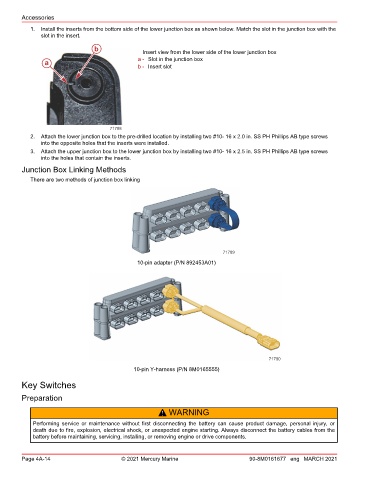
           1.  Install the inserts from the bottom side of the lower junction box as shown below. Match the slot in the junction box with the
               slot in the insert.

                                b               Insert view from the lower side of the lower junction box
                                               a - Slot in the junction box
                a
                                               b - Insert slot


                                     71788
           2.  Attach the lower junction box to the pre‑drilled location by installing two #10‑ 16 x 2.0 in. SS PH Phillips AB type screws
               into the opposite holes that the inserts were installed.
           3.  Attach the upper junction box to the lower junction box by installing two #10‑ 16 x 2.5 in. SS PH Phillips AB type screws
               into the holes that contain the inserts.
        Junction Box Linking Methods
           There are two methods of junction box linking


                                                                           71789
                                              10-pin adapter (P/N 892453A01)


                                                                                          71790
                                             10-pin Y-harness (P/N 8M0165555)

        Key Switches

        Preparation

                                                      !  WARNING
            Performing  service  or  maintenance  without  first  disconnecting  the  battery  can  cause  product  damage,  personal  injury,  or
            death due to fire, explosion, electrical shock, or unexpected engine starting. Always disconnect the battery cables from the
            battery before maintaining, servicing, installing, or removing engine or drive components.


        Page 4A-14                       © 2021 Mercury Marine                      90-8M0161677 eng MARCH 2021

