


Page 123 - Installation Manual - GenII DTS
P. 123
Accessories
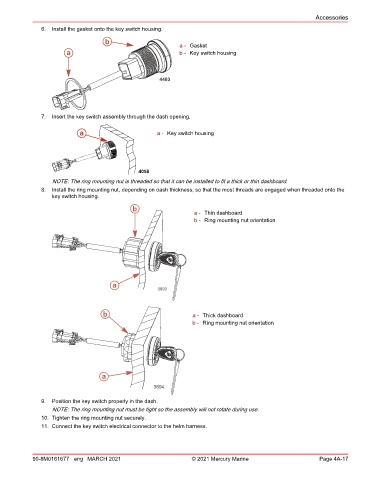
               6.  Install the gasket onto the key switch housing.

                                    b
                                                            a - Gasket
                       a                                    b - Key switch housing


                                                      4403


               7.  Insert the key switch assembly through the dash opening.

                           a                         a - Key switch housing


                                               4058
                  NOTE: The ring mounting nut is threaded so that it can be installed to fit a thick or thin dashboard.
               8.  Install the ring mounting nut, depending on dash thickness, so that the most threads are engaged when threaded onto the
                  key switch housing.
                                             b
                                                                 a - Thin dashboard
                                                                 b - Ring mounting nut orientation


                                      a
                                                     3893


                                   b                             a - Thick dashboard
                                                                 b - Ring mounting nut orientation


                                   a
                                                    3894

               9.  Position the key switch properly in the dash.
                  NOTE: The ring mounting nut must be tight so the assembly will not rotate during use.
               10. Tighten the ring mounting nut securely.
               11. Connect the key switch electrical connector to the helm harness.


            90-8M0161677 eng MARCH 2021                         © 2021 Mercury Marine                      Page 4A-17

