


Page 22 - Computing book 6
P. 22
Document Creation                                                                    Class 6


                                                 Document Creation

               Header and Footer:

               The header is a section of the document that appears in the top margin, while the footer is a section
               of the document that appears in the bottom margin. Headers and footers generally contain
               additional information such as page numbers, dates, an author's name, and footnotes, which can
               help keep longer documents organized and make them easier to read. Text entered in the header or
               footer will appear on each page of the document.

               Insert Header and Footer in a Document:
               In our example, we want to display the author's name at the top of each page, so we'll place it in the
               header.
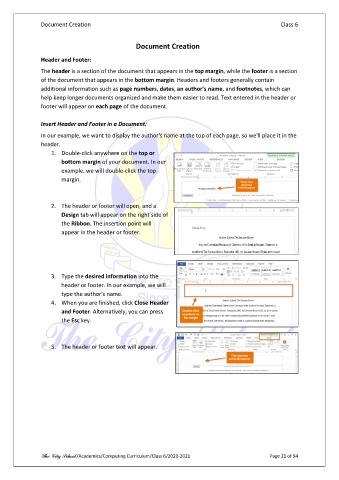
                   1.  Double-click anywhere on the top or
                       bottom margin of your document. In our
                       example, we will double-click the top
                       margin.


                   2.  The header or footer will open, and a
                       Design tab will appear on the right side of
                       the Ribbon. The insertion point will
                       appear in the header or footer.


                   3.  Type the desired information into the
                       header or footer. In our example, we will
                       type the author's name.
                   4.  When you are finished, click Close Header
                       and Footer. Alternatively, you can press
                       the Esc key.


                   5.  The header or footer text will appear.


               The City School /Academics/Computing Curriculum/Class 6/2020-2021                Page 21 of 94

