


Page 21 - Computing book 6
P. 21
Analysing Data                                                                       Class 6


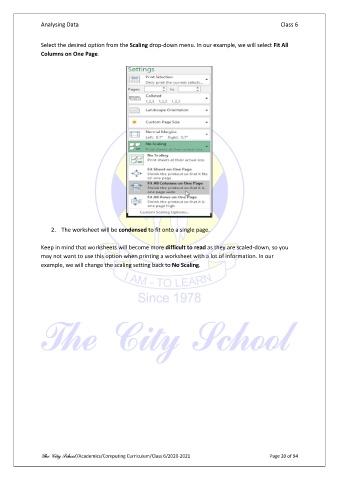
               Select the desired option from the Scaling drop-down menu. In our example, we will select Fit All
               Columns on One Page.


                   2.  The worksheet will be condensed to fit onto a single page.

               Keep in mind that worksheets will become more difficult to read as they are scaled-down, so you
               may not want to use this option when printing a worksheet with a lot of information. In our
               example, we will change the scaling setting back to No Scaling.


               The City School /Academics/Computing Curriculum/Class 6/2020-2021                Page 20 of 94

