


Page 35 - Computing Book 4
P. 35
Let’s Present                                                                        Class 4


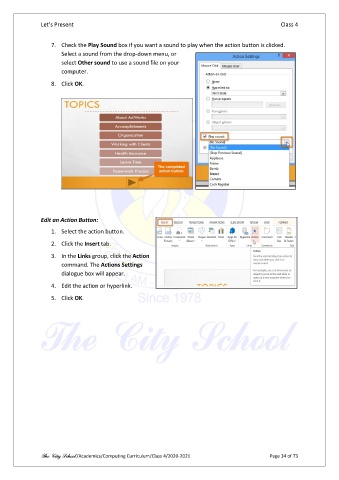
                   7.  Check the Play Sound box if you want a sound to play when the action button is clicked.
                       Select a sound from the drop-down menu, or
                       select Other sound to use a sound file on your
                       computer.

                   8.  Click OK.


               Edit an Action Button:
                   1.  Select the action button.

                   2.  Click the Insert tab.

                   3.  In the Links group, click the Action
                       command. The Actions Settings
                       dialogue box will appear.

                   4.  Edit the action or hyperlink.

                   5.  Click OK.


               The City School /Academics/Computing Curriculum/Class 4/2020-2021                Page 34 of 73

