


Page 36 - Computing Book 4
P. 36
Let’s Present                                                                        Class 4


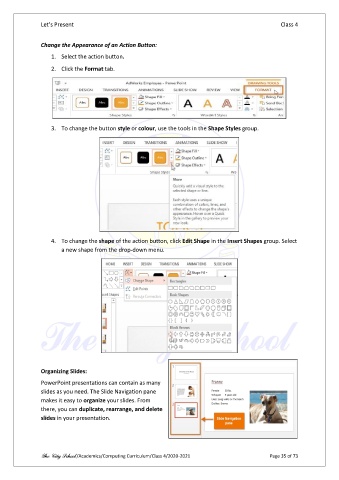
               Change the Appearance of an Action Button:

                   1.  Select the action button.
                   2.  Click the Format tab.


                   3.  To change the button style or colour, use the tools in the Shape Styles group.


                   4.  To change the shape of the action button, click Edit Shape in the Insert Shapes group. Select
                       a new shape from the drop-down menu.


               Organizing Slides:
               PowerPoint presentations can contain as many
               slides as you need. The Slide Navigation pane
               makes it easy to organize your slides. From
               there, you can duplicate, rearrange, and delete
               slides in your presentation.


               The City School /Academics/Computing Curriculum/Class 4/2020-2021                Page 35 of 73

