


Page 30 - Learn To Program With Scratch
P. 30
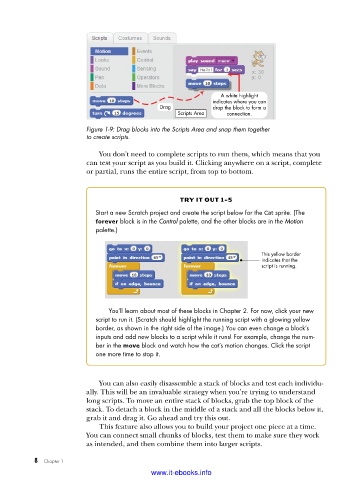
A white highlight
                                                            indicates where you can
                                             Drag           drop the block to form a
                                                  Scripts Area  connection.

                         Figure 1-9: Drag blocks into the Scripts Area and snap them together
                         to create scripts .

                             You don’t need to complete scripts to run them, which means that you
                         can test your script as you build it. Clicking anywhere on a script, complete
                         or partial, runs the entire script, from top to bottom.


                                                   try it out 1-5
                            Start a new Scratch project and create the script below for the Cat sprite . (The
                            forever block is in the Control palette, and the other blocks are in the Motion
                            palette .)


                                                                          This yellow border
                                                                          indicates that the
                                                                          script is running.


                               You’ll learn about most of these blocks in Chapter 2 . For now, click your new
                            script to run it . (Scratch should highlight the running script with a glowing yellow
                            border, as shown in the right side of the image .) You can even change a block’s
                            inputs and add new blocks to a script while it runs! For example, change the num-
                            ber in the move block and watch how the cat’s motion changes . Click the script
                            one more time to stop it .


                             You can also easily disassemble a stack of blocks and test each individu-
                         ally. This will be an invaluable strategy when you’re trying to understand
                         long scripts. To move an entire stack of blocks, grab the top block of the
                         stack. To detach a block in the middle of a stack and all the blocks below it,
                         grab it and drag it. Go ahead and try this out.
                             This feature also allows you to build your project one piece at a time.
                         You can connect small chunks of blocks, test them to make sure they work
                         as intended, and then combine them into larger scripts.


           8   Chapter 1
                                           www.it-ebooks.info

