


Page 35 - Learn To Program With Scratch
P. 35
In the Edit menu, Undelete will bring back the last block, script,
                          sprite, costume, or sound you deleted. The Small stage layout option
                          shrinks the Stage and gives the Scripts Area more room. Selecting Turbo
                          mode increases the speed of some blocks. For example, executing a move
                          block 1,000 times may take about 70 seconds in normal mode and about
                          0.2 seconds in Turbo mode.
                             Now that you’ve seen the essentials of the Scratch toolbar, we’ll talk
                          briefly about Scratch’s built-in Paint Editor.


               Paint editor

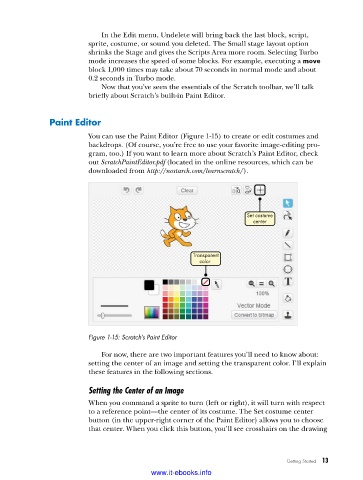
                          You can use the Paint Editor (Figure 1-15) to create or edit costumes and
                          backdrops. (Of course, you’re free to use your favorite image-editing pro-
                          gram, too.) If you want to learn more about Scratch’s Paint Editor, check
                          out ScratchPaintEditor.pdf (located in the online resources, which can be
                          downloaded from http://nostarch.com/learnscratch/).


                                                                      Set costume
                                                                       center


                                                       Transparent
                                                        color


                          Figure 1-15: Scratch’s Paint Editor

                             For now, there are two important features you’ll need to know about:
                          setting the center of an image and setting the transparent color. I’ll explain
                          these features in the following sections.

                          Setting the Center of an Image
                          When you command a sprite to turn (left or right), it will turn with respect
                          to a reference point—the center of its costume. The Set costume center
                          button (in the upper-right corner of the Paint Editor) allows you to choose
                          that center. When you click this button, you’ll see crosshairs on the drawing


                                                                                 Getting Started   13

                                           www.it-ebooks.info

