


Page 161 - Python Data Science Handbook
P. 161
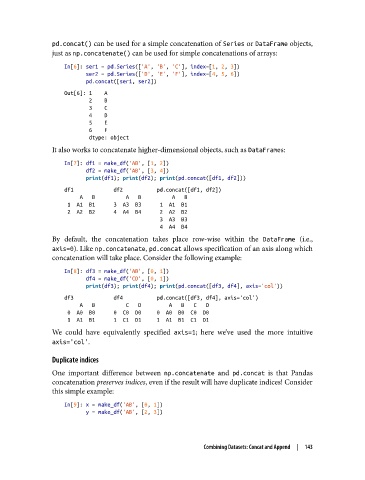
pd.concat() can be used for a simple concatenation of Series or DataFrame objects,
               just as np.concatenate() can be used for simple concatenations of arrays:

                   In[6]: ser1 = pd.Series(['A', 'B', 'C'], index=[1, 2, 3])
                          ser2 = pd.Series(['D', 'E', 'F'], index=[4, 5, 6])
                          pd.concat([ser1, ser2])
                   Out[6]: 1    A
                           2    B
                           3    C
                           4    D
                           5    E
                           6    F
                           dtype: object
               It also works to concatenate higher-dimensional objects, such as DataFrames:

                   In[7]: df1 = make_df('AB', [1, 2])
                          df2 = make_df('AB', [3, 4])
                          print(df1); print(df2); print(pd.concat([df1, df2]))
                   df1             df2           pd.concat([df1, df2])
                        A   B          A   B          A   B
                    1  A1  B1      3  A3  B3      1  A1  B1
                    2  A2  B2      4  A4  B4      2  A2  B2
                                                  3  A3  B3
                                                  4  A4  B4
               By default, the concatenation takes place row-wise within the DataFrame  (i.e.,
               axis=0). Like np.concatenate, pd.concat allows specification of an axis along which
               concatenation will take place. Consider the following example:
                   In[8]: df3 = make_df('AB', [0, 1])
                          df4 = make_df('CD', [0, 1])
                          print(df3); print(df4); print(pd.concat([df3, df4], axis='col'))
                   df3             df4           pd.concat([df3, df4], axis='col')
                        A   B          C   D         A   B   C   D
                    0  A0  B0      0  C0  D0     0  A0  B0  C0  D0
                    1  A1  B1      1  C1  D1     1  A1  B1  C1  D1
               We could have equivalently specified axis=1; here we’ve used the more intuitive
               axis='col'.

               Duplicate indices

               One important difference between np.concatenate  and pd.concat  is that Pandas
               concatenation preserves indices, even if the result will have duplicate indices! Consider
               this simple example:

                   In[9]: x = make_df('AB', [0, 1])
                          y = make_df('AB', [2, 3])


                                                         Combining Datasets: Concat and Append  |  143

