


Page 163 - Python Data Science Handbook
P. 163
The result is a multiply indexed DataFrame, and we can use the tools discussed in
               “Hierarchical Indexing” on page 128  to transform this data into the representation
               we’re interested in.

               Concatenation with joins
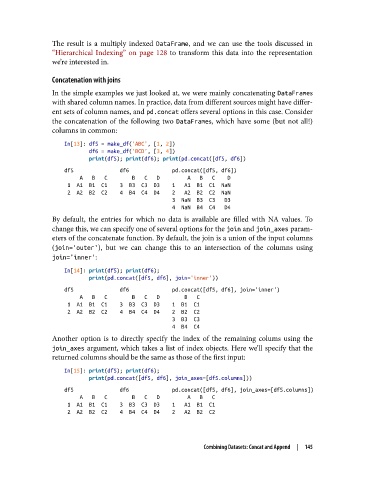
               In the simple examples we just looked at, we were mainly concatenating DataFrames
               with shared column names. In practice, data from different sources might have differ‐
               ent sets of column names, and pd.concat offers several options in this case. Consider
               the concatenation of the following two DataFrames, which have some (but not all!)
               columns in common:
                   In[13]: df5 = make_df('ABC', [1, 2])
                           df6 = make_df('BCD', [3, 4])
                           print(df5); print(df6); print(pd.concat([df5, df6])
                   df5               df6              pd.concat([df5, df6])
                        A   B   C        B   C   D         A   B   C    D
                    1  A1  B1  C1    3  B3  C3  D3    1   A1  B1  C1  NaN
                    2  A2  B2  C2    4  B4  C4  D4    2   A2  B2  C2  NaN
                                                      3  NaN  B3  C3   D3
                                                      4  NaN  B4  C4   D4
               By default, the entries for which no data is available are filled with NA values. To
               change this, we can specify one of several options for the join and join_axes param‐
               eters of the concatenate function. By default, the join is a union of the input columns
               (join='outer'), but we can change this to an intersection of the columns using
               join='inner':

                   In[14]: print(df5); print(df6);
                           print(pd.concat([df5, df6], join='inner'))
                   df5               df6              pd.concat([df5, df6], join='inner')
                        A   B   C        B   C   D        B   C
                    1  A1  B1  C1    3  B3  C3  D3    1  B1  C1
                    2  A2  B2  C2    4  B4  C4  D4    2  B2  C2
                                                      3  B3  C3
                                                      4  B4  C4
               Another option is to directly specify the index of the remaining colums using the
               join_axes  argument, which takes a list of index objects. Here we’ll specify that the
               returned columns should be the same as those of the first input:
                   In[15]: print(df5); print(df6);
                           print(pd.concat([df5, df6], join_axes=[df5.columns]))

                   df5               df6              pd.concat([df5, df6], join_axes=[df5.columns])
                        A   B   C        B   C   D         A   B   C
                    1  A1  B1  C1    3  B3  C3  D3    1   A1  B1  C1
                    2  A2  B2  C2    4  B4  C4  D4    2   A2  B2  C2


                                                         Combining Datasets: Concat and Append  |  145

