


Page 162 - Python Data Science Handbook
P. 162
y.index = x.index  # make duplicate indices!
                          print(x); print(y); print(pd.concat([x, y]))
                   x             y            pd.concat([x, y])
                        A   B        A   B        A   B
                    0  A0  B0    0  A2  B2    0  A0  B0
                    1  A1  B1    1  A3  B3    1  A1  B1
                                              0  A2  B2
                                              1  A3  B3
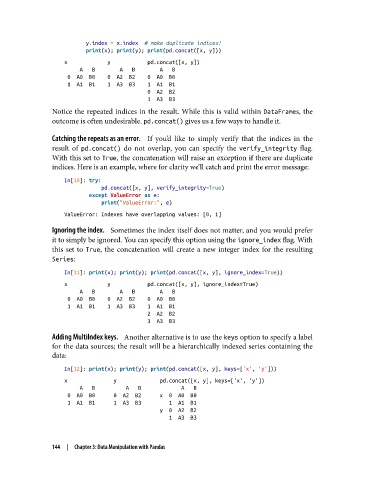
               Notice the repeated indices in the result. While this is valid within DataFrames, the
               outcome is often undesirable. pd.concat() gives us a few ways to handle it.

               Catching the repeats as an error.     If you’d like to simply verify that the indices in the
               result of pd.concat()  do not overlap, you can specify the verify_integrity  flag.
               With this set to True, the concatenation will raise an exception if there are duplicate
               indices. Here is an example, where for clarity we’ll catch and print the error message:
                   In[10]: try:
                               pd.concat([x, y], verify_integrity=True)
                           except ValueError as e:
                               print("ValueError:", e)
                   ValueError: Indexes have overlapping values: [0, 1]

               Ignoring the index.    Sometimes the index itself does not matter, and you would prefer
               it to simply be ignored. You can specify this option using the ignore_index flag. With
               this set to True, the concatenation will create a new integer index for the resulting
               Series:
                   In[11]: print(x); print(y); print(pd.concat([x, y], ignore_index=True))
                   x             y            pd.concat([x, y], ignore_index=True)
                        A   B        A   B        A   B
                    0  A0  B0    0  A2  B2    0  A0  B0
                    1  A1  B1    1  A3  B3    1  A1  B1
                                              2  A2  B2
                                              3  A3  B3
               Adding MultiIndex keys.    Another alternative is to use the keys option to specify a label
               for the data sources; the result will be a hierarchically indexed series containing the
               data:

                   In[12]: print(x); print(y); print(pd.concat([x, y], keys=['x', 'y']))
                   x               y              pd.concat([x, y], keys=['x', 'y'])
                        A   B          A   B             A   B
                    0  A0  B0      0  A2  B2      x  0  A0  B0
                    1  A1  B1      1  A3  B3         1  A1  B1
                                                  y  0  A2  B2
                                                     1  A3  B3


               144  |  Chapter 3: Data Manipulation with Pandas

