


Page 330 - Python Data Science Handbook
P. 330
To be fair, the Matplotlib team is addressing this: it has recently added the plt.style
               tools (discussed in “Customizing Matplotlib: Configurations and Stylesheets” on page
               282), and is starting to handle Pandas data more seamlessly. The 2.0 release of the
               library will include a new default stylesheet that will improve on the current status
               quo. But for all the reasons just discussed, Seaborn remains an extremely useful
               add-on.

               Seaborn Versus Matplotlib

               Here is an example of a simple random-walk plot in Matplotlib, using its classic plot
               formatting and colors. We start with the typical imports:
                   In[1]: import matplotlib.pyplot as plt
                          plt.style.use('classic')
                          %matplotlib inline
                          import numpy as np
                          import pandas as pd
               Now we create some random walk data:

                   In[2]: # Create some data
                          rng = np.random.RandomState(0)
                          x = np.linspace(0, 10, 500)
                          y = np.cumsum(rng.randn(500, 6), 0)
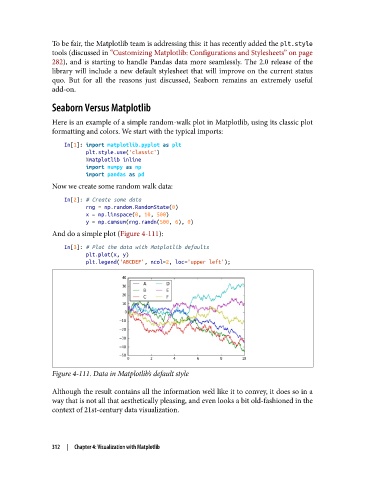
               And do a simple plot (Figure 4-111):

                   In[3]: # Plot the data with Matplotlib defaults
                          plt.plot(x, y)
                          plt.legend('ABCDEF', ncol=2, loc='upper left');


               Figure 4-111. Data in Matplotlib’s default style
               Although the result contains all the information we’d like it to convey, it does so in a
               way that is not all that aesthetically pleasing, and even looks a bit old-fashioned in the
               context of 21st-century data visualization.


               312  |  Chapter 4: Visualization with Matplotlib

