


Page 385 - Python Data Science Handbook
P. 385
In[10]: from sklearn.preprocessing import PolynomialFeatures
                           from sklearn.linear_model import LinearRegression
                           from sklearn.pipeline import make_pipeline

                           def PolynomialRegression(degree=2, **kwargs):
                               return make_pipeline(PolynomialFeatures(degree),
                                                    LinearRegression(**kwargs))
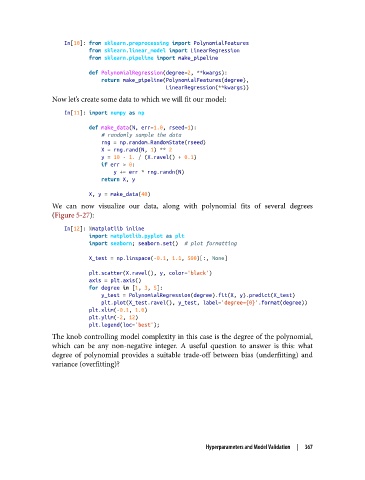
               Now let’s create some data to which we will fit our model:

                   In[11]: import numpy as np
                           def make_data(N, err=1.0, rseed=1):
                               # randomly sample the data
                               rng = np.random.RandomState(rseed)
                               X = rng.rand(N, 1) ** 2
                               y = 10 - 1. / (X.ravel() + 0.1)
                               if err > 0:
                                   y += err * rng.randn(N)
                               return X, y

                           X, y = make_data(40)
               We can now visualize our data, along with polynomial fits of several degrees
               (Figure 5-27):

                   In[12]: %matplotlib inline
                           import matplotlib.pyplot as plt
                           import seaborn; seaborn.set()  # plot formatting

                           X_test = np.linspace(-0.1, 1.1, 500)[:, None]
                           plt.scatter(X.ravel(), y, color='black')
                           axis = plt.axis()
                           for degree in [1, 3, 5]:
                               y_test = PolynomialRegression(degree).fit(X, y).predict(X_test)
                               plt.plot(X_test.ravel(), y_test, label='degree={0}'.format(degree))
                           plt.xlim(-0.1, 1.0)
                           plt.ylim(-2, 12)
                           plt.legend(loc='best');
               The knob controlling model complexity in this case is the degree of the polynomial,
               which can be any non-negative integer. A useful question to answer is this: what
               degree of polynomial provides a suitable trade-off between bias (underfitting) and
               variance (overfitting)?


                                                          Hyperparameters and Model Validation  |  367

