


Page 441 - Python Data Science Handbook
P. 441
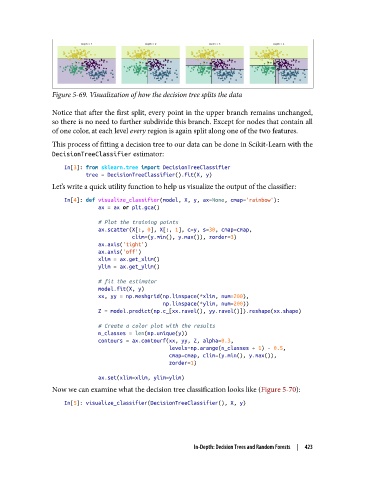
Figure 5-69. Visualization of how the decision tree splits the data

               Notice that after the first split, every point in the upper branch remains unchanged,
               so there is no need to further subdivide this branch. Except for nodes that contain all
               of one color, at each level every region is again split along one of the two features.
               This process of fitting a decision tree to our data can be done in Scikit-Learn with the
               DecisionTreeClassifier estimator:
                   In[3]: from sklearn.tree import DecisionTreeClassifier
                          tree = DecisionTreeClassifier().fit(X, y)
               Let’s write a quick utility function to help us visualize the output of the classifier:

                   In[4]: def visualize_classifier(model, X, y, ax=None, cmap='rainbow'):
                              ax = ax or plt.gca()

                              # Plot the training points
                              ax.scatter(X[:, 0], X[:, 1], c=y, s=30, cmap=cmap,
                                         clim=(y.min(), y.max()), zorder=3)
                              ax.axis('tight')
                              ax.axis('off')
                              xlim = ax.get_xlim()
                              ylim = ax.get_ylim()

                              # fit the estimator
                              model.fit(X, y)
                              xx, yy = np.meshgrid(np.linspace(*xlim, num=200),
                                                   np.linspace(*ylim, num=200))
                              Z = model.predict(np.c_[xx.ravel(), yy.ravel()]).reshape(xx.shape)

                              # Create a color plot with the results
                              n_classes = len(np.unique(y))
                              contours = ax.contourf(xx, yy, Z, alpha=0.3,
                                                     levels=np.arange(n_classes + 1) - 0.5,
                                                     cmap=cmap, clim=(y.min(), y.max()),
                                                     zorder=1)
                              ax.set(xlim=xlim, ylim=ylim)
               Now we can examine what the decision tree classification looks like (Figure 5-70):

                   In[5]: visualize_classifier(DecisionTreeClassifier(), X, y)


                                                       In-Depth: Decision Trees and Random Forests  |  423

