


Page 25 - MercNET User's Guide
P. 25
• Select Vessel Config from the Orders menu

        Generate a Quote
               1.  Begin building your configuration by entering the Engine Application Information
               2.  Select the appropriate Controls and Steering information
               3.  After the required fields are completed, the Bill of Materials will be generated
        Note: All questions marked with a red asterisk (*) are rquired and must be answered
               4.  Select Save Configuration
               5.  Select the Create Quote tab
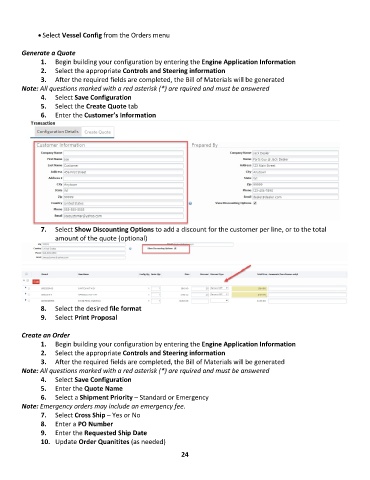
               6.  Enter the Customer’s Information


               7.  Select Show Discounting Options to add a discount for the customer per line, or to the total
                   amount of the quote (optional)


               8.  Select the desired file format
               9.  Select Print Proposal

        Create an Order
               1.  Begin building your configuration by entering the Engine Application Information
               2.  Select the appropriate Controls and Steering information
               3.  After the required fields are completed, the Bill of Materials will be generated
        Note: All questions marked with a red asterisk (*) are rquired and must be answered
               4.  Select Save Configuration
               5.  Enter the Quote Name
               6.  Select a Shipment Priority – Standard or Emergency
        Note: Emergency orders may include an emergency fee.
               7.  Select Cross Ship – Yes or No
               8.  Enter a PO Number
               9.  Enter the Requested Ship Date
               10.  Update Order Quanitites (as needed)

                                                             24

