


Page 26 - MercNET User's Guide
P. 26
Cancel Backorder
        Cancel items that have not yet been shipped and are not on credit hold.
              1. Select item with a check mark in the Select column
              2. Update quantity to desired amount (zero if cancelling item) in the Order Qty column
              3. Select Update or Cancel

        Non-Active Parts Inquiry
        Non-Active Parts Inquiry is the place to look to find parts that are “No Longer Available” from Mercury, or are
        “Fully Superseded”, but may be for sale from other Mercury customers.
              • •   Select Non-Active Parts Inquiry from the Orders Menu
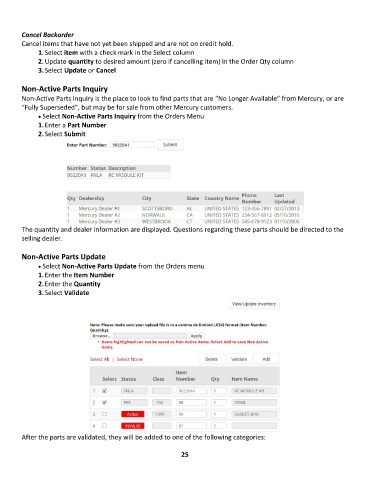
              1. Enter a Part Number
              2. Select Submit


        The quantity and dealer information are displayed. Questions regarding these parts should be directed to the
        selling dealer.

        Non-Active Parts Update
              • •   Select Non-Active Parts Update from the Orders menu
              1. Enter the Item Number
              2. Enter the Quantity
              3. Select Validate


        After the parts are validated, they will be added to one of the following categories:

                                                             25

