


Page 8 - Employee Navigator Guide
P. 8
How to Import Employees and Enrollment data


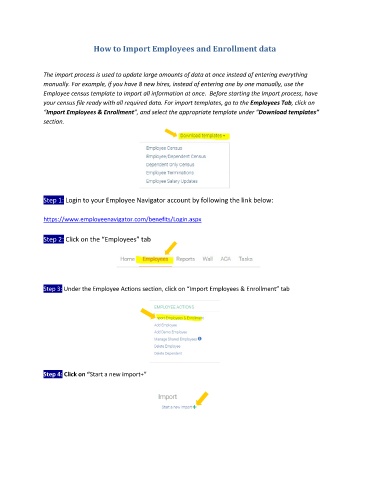
               The import process is used to update large amounts of data at once instead of entering everything
               manually. For example, if you have 8 new hires, instead of entering one by one manually, use the
               Employee census template to import all information at once.  Before starting the Import process, have
               your census file ready with all required data. For import templates, go to the Employees Tab, click on
               “Import Employees & Enrollment”, and select the appropriate template under “Download templates”
               section.


               Step 1: Login to your Employee Navigator account by following the link below:

               https://www.employeenavigator.com/benefits/Login.aspx

               Step 2: Click on the “Employees” tab


               Step 3: Under the Employee Actions section, click on “Import Employees & Enrollment” tab


               Step 4: Click on “Start a new import+”

