


Page 267 - Python Data Science Handbook
P. 267
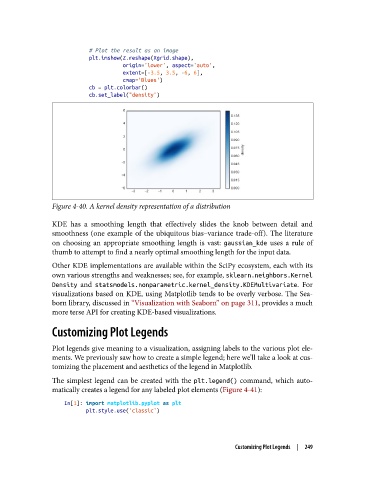
# Plot the result as an image
                           plt.imshow(Z.reshape(Xgrid.shape),
                                      origin='lower', aspect='auto',
                                      extent=[-3.5, 3.5, -6, 6],
                                      cmap='Blues')
                           cb = plt.colorbar()
                           cb.set_label("density")


               Figure 4-40. A kernel density representation of a distribution

               KDE has a smoothing length that effectively slides the knob between detail and
               smoothness (one example of the ubiquitous bias–variance trade-off). The literature
               on choosing an appropriate smoothing length is vast: gaussian_kde  uses a rule of
               thumb to attempt to find a nearly optimal smoothing length for the input data.

               Other KDE implementations are available within the SciPy ecosystem, each with its
               own various strengths and weaknesses; see, for example, sklearn.neighbors.Kernel
               Density  and statsmodels.nonparametric.kernel_density.KDEMultivariate. For
               visualizations based on KDE, using Matplotlib tends to be overly verbose. The Sea‐
               born library, discussed in “Visualization with Seaborn” on page 311, provides a much
               more terse API for creating KDE-based visualizations.

               Customizing Plot Legends

               Plot legends give meaning to a visualization, assigning labels to the various plot ele‐
               ments. We previously saw how to create a simple legend; here we’ll take a look at cus‐
               tomizing the placement and aesthetics of the legend in Matplotlib.

               The simplest legend can be created with the plt.legend()  command, which auto‐
               matically creates a legend for any labeled plot elements (Figure 4-41):

                   In[1]: import matplotlib.pyplot as plt
                          plt.style.use('classic')


                                                                  Customizing Plot Legends  |  249

