


Page 341 - Python Data Science Handbook
P. 341
In[22]:
                   # !curl -O https://raw.githubusercontent.com/jakevdp/marathon-data/
                   # master/marathon-data.csv
                   In[23]: data = pd.read_csv('marathon-data.csv')
                           data.head()
                   Out[23]:    age gender     split     final
                            0   33      M  01:05:38  02:08:51
                            1   32      M  01:06:26  02:09:28
                            2   31      M  01:06:49  02:10:42
                            3   38      M  01:06:16  02:13:45
                            4   31      M  01:06:32  02:13:59
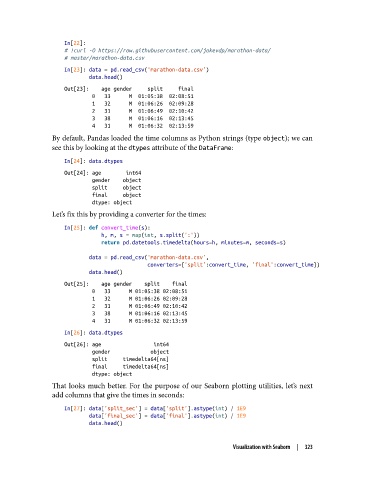
               By default, Pandas loaded the time columns as Python strings (type object); we can
               see this by looking at the dtypes attribute of the DataFrame:

                   In[24]: data.dtypes
                   Out[24]: age        int64
                            gender    object
                            split     object
                            final     object
                            dtype: object
               Let’s fix this by providing a converter for the times:

                   In[25]: def convert_time(s):
                               h, m, s = map(int, s.split(':'))
                               return pd.datetools.timedelta(hours=h, minutes=m, seconds=s)

                           data = pd.read_csv('marathon-data.csv',
                                              converters={'split':convert_time, 'final':convert_time})
                           data.head()
                   Out[25]:    age gender    split    final
                            0   33      M 01:05:38 02:08:51
                            1   32      M 01:06:26 02:09:28
                            2   31      M 01:06:49 02:10:42
                            3   38      M 01:06:16 02:13:45
                            4   31      M 01:06:32 02:13:59
                   In[26]: data.dtypes
                   Out[26]: age                 int64
                            gender             object
                            split     timedelta64[ns]
                            final     timedelta64[ns]
                            dtype: object
               That looks much better. For the purpose of our Seaborn plotting utilities, let’s next
               add columns that give the times in seconds:

                   In[27]: data['split_sec'] = data['split'].astype(int) / 1E9
                           data['final_sec'] = data['final'].astype(int) / 1E9
                           data.head()


                                                                 Visualization with Seaborn  |  323

